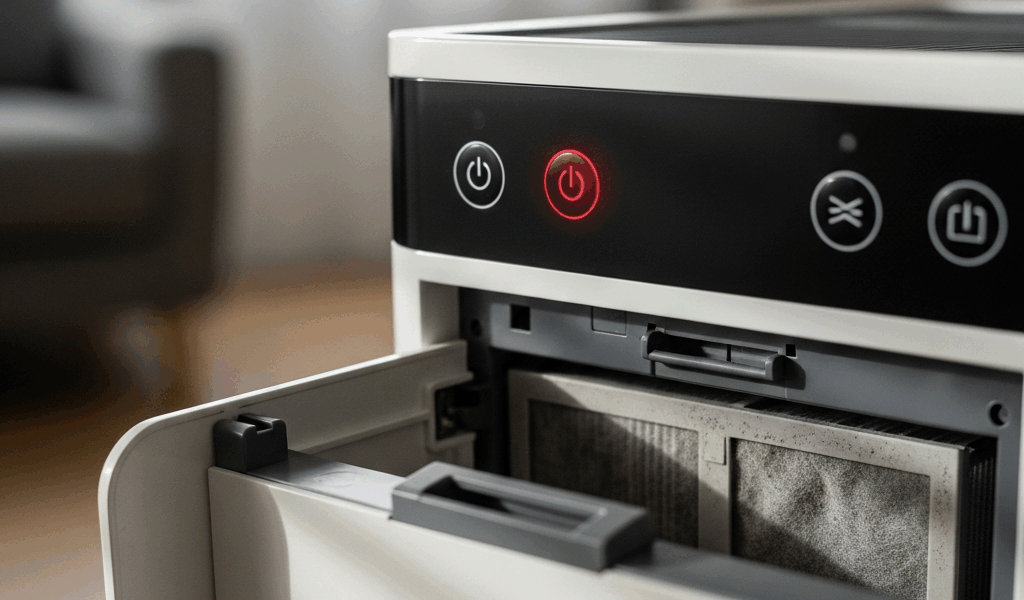
What a Blinking Red Light Usually Means
Air purifier troubleshooting has gotten complicated with all the conflicting advice flying around. As someone who has spent the last three years diagnosing these machines — for myself, for neighbors, for anyone who’d let me poke around their equipment — I learned everything there is to know about what that blinking red light actually means. Today, I will share it all with you.
First, the thing that matters most: blinking red and solid red are not the same thing. Not even close. Blinking red is your unit nudging you. Solid red is your unit screaming at you to stop. I’ve watched people haul perfectly functional purifiers back to Costco because they couldn’t tell the difference. Don’t make my mistake — or theirs.
Almost every blinking red situation comes down to one of two culprits: a filter reminder or an air quality sensor alert. Not a busted motor. Not an electrical fire waiting to happen. Just your purifier asking for a little attention.
Your Filter Needs to Be Replaced or Reset
Probably should have opened with this section, honestly. This is the cause behind the vast majority of blinking red lights, and it’s also the one people botch most consistently.
But what is a filter reminder light? In essence, it’s a countdown timer. But it’s much more than that — most people assume their purifier is actually measuring how dirty the filter is. It’s not. Your Levoit, Coway, Winix, or Dyson is tracking runtime hours. Somewhere between 800 and 2,000 hours — depending on the model — that timer trips and the red light starts blinking. The filter could be spotless. Doesn’t matter. The clock ran out.
Here’s where the trouble starts. You buy a fresh filter — maybe a Coway AP-1512HH replacement, around $22 on Amazon — swap it in, power the unit back on, and the light is still blinking. So you assume the unit is broken. It’s not. You just didn’t reset the timer.
The reset process varies slightly by model, but the idea is the same across brands. Most units have a small recessed button on the side or bottom panel. Press and hold it for 3 to 5 seconds. The light should stop blinking or shift color immediately. On certain Coway models, hold the filter button for exactly 3 seconds. On most Levoit units, there’s a dedicated reset switch — tiny, easy to miss, usually near the base. Check your manual. It takes 30 seconds to find the right page and another 10 to actually do it.
I learned this the hard way after changing my own filter and spending 20 minutes convinced my purifier was dying. The reset button is deliberately subtle — manufacturers don’t want accidental resets triggering mid-cycle.
Changed the filter, pressed reset, light still blinking after 30 minutes of runtime? Move on to the next section. But nine times out of ten, this is it.
The Air Quality Sensor Is Dirty or Blocked
Some purifiers — particularly mid-range and premium models — use a laser particle sensor or optical monitor to read actual air quality in real time. When that sensor lens gets coated with dust, the unit either blinks red continuously or throws a red alert because it’s reading falsely terrible air quality. Both scenarios look identical from the outside.
Locate the sensor opening first. It’s usually a small slot or window on the side or bottom of the unit — sometimes labeled “PM 2.5 Sensor” in the manual. Looks like a tiny black plastic window. Sometimes you can spot a small red light inside it.
Turn the unit off. Grab a dry cotton swab — dry, not wet — and gently swipe inside that slot. That’s it. You’ll probably pull out a surprising amount of compacted dust, especially if you’ve got pets, live near a construction site, or made it through a high-pollen spring without cleaning it. Don’t push the swab in more than half an inch. Surface clean only.
After cleaning, run the unit for 30 to 60 minutes before deciding whether it worked. Sensors need a little runtime to recalibrate after being cleaned.
One caveat worth knowing: if there’s been wildfire smoke nearby or a renovation just wrapped up in your home, the blinking red might actually be accurate. The air really is bad. Run the unit for an hour with windows closed. The light should clear on its own as conditions improve. That’s the sensor doing exactly what it should.
The Unit Is Overheating or Has Blocked Vents
Restricted airflow causes thermal warnings on a lot of models — and those warnings show up as a blinking red light. This one is almost always a placement problem.
Move the unit at least 6 to 12 inches away from walls, furniture, and corners. All sides need clearance, especially the intake side. If your purifier is tucked inside a cabinet or wedged into a tight corner, it’s recirculating the same warm air over and over. Temperatures climb. Red light blinks. That’s what makes proper placement so endearing to us purifier people — it costs nothing and fixes a lot.
Check the intake vents while you’re at it. The Winix 5500-2, for example, has its intake grille on the back panel — it collects dust fast and most people never look at it. Wipe the grilles down with a dry cloth or a soft brush. Don’t use anything wet near the motor housing.
After repositioning and cleaning, let the unit sit unplugged for 15 minutes before restarting. Thermal sensors can be slow to reset — the light might blink for another cycle or two even after the actual temperature drops. Give it time.
This problem shows up most often in smaller bedroom units running on maximum speed for eight straight hours in a poorly ventilated room. Setting 4 out of 4, all night, in a closet-sized space — it gets hot.
When a Blinking Red Light Means a Real Problem
Sometimes — not often, but sometimes — the blinking red light is pointing at an actual hardware fault. Motor errors, fan obstructions, internal sensor failures. These won’t respond to filter resets or cotton swabs.
Watch for a few specific warning signs alongside the blinking: grinding, squealing, or rattling sounds coming from inside the unit; zero airflow from the exhaust even on high speed; or a blinking pattern that doesn’t match what your manual describes for standard filter reminders. That last one is underrated diagnostic information. If your manual says the filter reminder blinks three times per second and yours is blinking once per second in a long pause pattern — something else is happening entirely.
So, without further ado, let’s lay out the practical sequence. Reset the filter timer first. Clean the air quality sensor second. Clear and reposition vents third. Let the unit cool completely fourth. Only after all four steps fail does it make sense to contact manufacturer support — and you should contact them before spending money on repairs or replacement. Coway, Levoit, and Winix all have model-specific troubleshooting pages. Some have live chat. Use it.
I’m apparently hard on air purifiers — I’ve owned four in three years — and methodical troubleshooting works for me while panic-returning units never does. Most blinking red lights are boring problems with boring solutions. Work through the list before assuming the worst.



Stay in the loop
Get the latest northwestcleanair.com updates delivered to your inbox.