What Kind of Noise Is It Making
Air purifier troubleshooting has gotten complicated with all the generic “check your filter” advice flying around. Spoiler: that answer doesn’t cover half the problems people actually deal with. A rattling sound means something completely different than a grinding one. A high-pitched whistle points somewhere else entirely compared to a low, droning hum. As someone who has spent the last three years diagnosing noisy air purifiers — for my own household, my parents’ place, and honestly just out of stubbornness — I learned everything there is to know about what these sounds actually mean. Today, I will share it all with you.
But what is a noise diagnosis? In essence, it’s listening carefully and matching what you hear to a specific mechanical cause. But it’s much more than that — it’s the difference between spending $40 on a new filter versus $180 on a unit you didn’t need to replace. So, without further ado, let’s dive in.
Sit near your unit for a few minutes. Is it rattling? Humming? Grinding? Whistling? Clicking? Once you’ve pinpointed the type, jump straight to that section below.
Rattling or Vibrating Noise
Rattling is probably the most common complaint — and also the most fixable. Something physical has come loose or shifted. That’s usually the whole story.
Turn off the unit and open the filter compartment first. Pull the filter out completely. Now look inside the housing itself. Anything loose in there? Debris? A stray piece of filter foam? I once found a bobby pin — my own, embarrassingly — wedged between the fan housing and the motor on my Levoit Core 400S. Created this maddening rattle I chased for four days before I spotted it. Don’t make my mistake. Check the obvious stuff first.
Next, inspect the filter seal. Most purifiers use a rubber gasket or foam frame around the filter edge — if that’s damaged or even slightly misaligned, the filter vibrates against the housing the whole time the unit runs. Reinstall the filter carefully. Every corner needs to sit flush in its groove. I reinstalled a filter after cleaning it once and somehow got it half an inch off-center. The unit sounded like maracas for a week. A full week.
Check the surface your unit is sitting on. Hard floor or a completely level table — not carpet, not a slightly tilted shelf. Uneven surfaces amplify every bit of internal movement. A small rubber furniture shim under the rear feet fixes this instantly if your floor isn’t cooperating. They’re about $6 for a pack of eight at any hardware store.
Finally, check the front and side panels. The plastic cover over the filter compartment loosens after you’ve opened it repeatedly — look for screws or latches that have worked themselves free. A loose panel rattling against the housing makes a surprisingly loud noise for something that simple. Tighten with a Phillips-head screwdriver and you’re done.
Rattling that starts suddenly almost always means something moved. Not motor degradation. Not a failing component. Something physically shifted.
Loud Humming or Buzzing Sound
Humming is a different animal. It’s usually motor or electrical-related, and it deserves more attention than rattling does — because it can signal real decline.
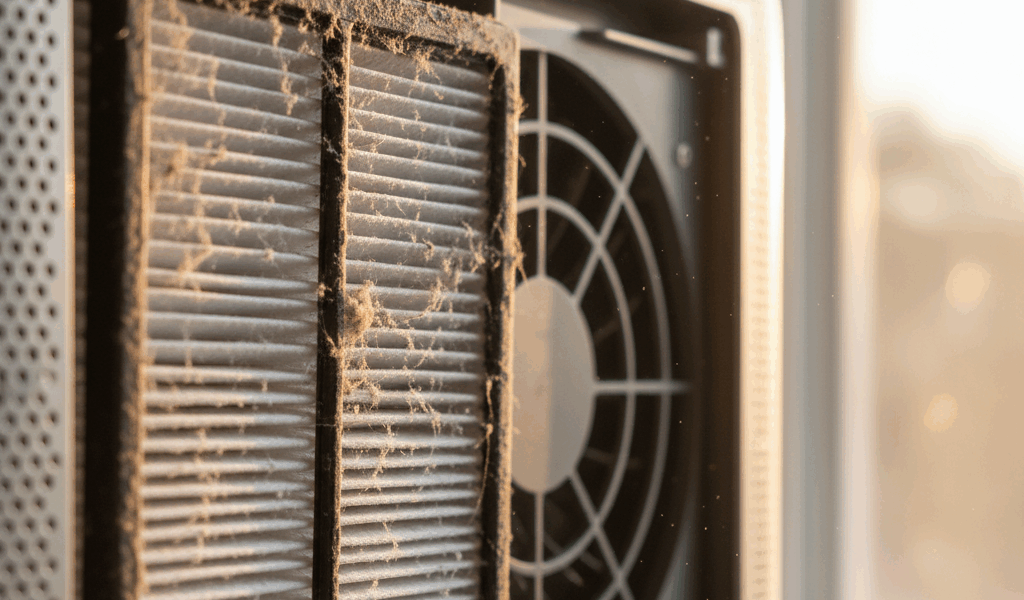
The most actionable cause, and the one to check first: a clogged filter. A dirty filter forces the motor to pull harder to move air through the medium. That extra strain produces a louder, deeper hum. Pull your filter out and hold it up to a window or lamp. Can you see light through it, or is it solid gray with dust? Replace it if it’s visibly soiled. Filters for most mid-range units run between $20 and $50 — the Coway AP-1512HH replacement is around $22, the Levoit Core 400S filter runs about $35.
I’m apparently terrible at filter replacement schedules, and stretching filters way past their replacement window is a mistake I’ve made more than once. Pushed a $35 Coway filter to six months instead of the recommended three. By month five, the hum was loud enough that I was convinced the motor was dying. Popped in a new filter and it went silent immediately. Motor was completely fine. Probably should have opened with this section, honestly.
A second cause worth checking: electromagnetic interference. If your purifier sits near a router, microwave, or other electronics, it may pick up electrical noise and amplify it through the casing. Move the unit a few feet away from those devices and observe for a day or two.
If your unit is three to four years old and the humming has been gradually increasing despite a clean filter — that’s the warning sign. Aging fan motor bearings wear out and produce progressively louder hum over weeks or months. At that point, replacement is smarter than repair.
Grinding or Clicking When Running
This is the urgent one. Grinding means something is contacting the fan blades or obstructing the motor. Stop running the unit — right now, not after you finish reading.
Unplug it. Wait a few minutes for residual movement to stop completely. Then open the unit according to its manual — most air purifiers let you access the fan housing without a full disassembly. Look directly at the fan blades. Spin one gently with your finger. It should rotate freely, no resistance, no wobble. Look for cracks, bends, or debris wedged between a blade and the housing wall.
Debris removal is straightforward — use something thin and blunt, like a plastic spoon or a butter knife, to carefully dislodge whatever’s in there. That’s what makes this fix endearing to us DIY troubleshooters. No replacement parts, no service calls. A plastic spoon and two minutes.
If a blade is visibly cracked or bent, the fan assembly needs replacing. Continuing to run a unit with a damaged blade means metal-on-metal friction with every rotation — it will worsen fast. Look up your model number and search for the replacement fan assembly. For popular models like the Winix 5500-2 or the Blueair Classic 480i, these parts are still available directly from the manufacturer or through Amazon.
Clicking is sometimes its own separate issue. A single click per full rotation usually means a blade is loose on its shaft rather than broken. Still a repair situation — but less urgent than a cracked blade grinding against the housing.
When to Replace Instead of Repair
Probably should have opened with this section, honestly. It’s the question underneath every other question here.
If your unit is over four years old and making persistent grinding or loud humming despite a fresh filter and clean fan, replacement is usually the smarter move. Parts for older models get harder to find, and replacement components often cost 40 to 60 percent of what a new entry-level unit runs anyway. That math stops making sense fast.
For newer units with clearly fixable problems — a clogged filter, a loose panel, an off-center filter install — repair is the right call every time. Clean the filter, tighten the panels, reseat everything properly. You’re done in twenty minutes.
While you won’t need a full toolkit for this, you will need a handful of things: a screwdriver set, a replacement filter for your specific model, and maybe rubber shims if your floor is uneven. That’s the whole list.
If you’re shopping for a replacement, noise ratings matter more than most people realize. Air purifiers are rated in decibels — look for units at 50 dB or lower for genuinely quiet operation. Most modern mid-range units land between 45 and 55 dB. I’m apparently a Coway person and the AP-1512HH works for me while budget sub-$80 units never seem to stay quiet past the eight-month mark. Units with adjustable fan speeds — most Levoit and Coway models have three to four settings — let you drop to the lowest setting during sleep hours. That alone cuts perceived noise significantly.
Start with the noise type. Fix what’s fixable. Replace what isn’t. Your ears will notice the difference by tonight.

Stay in the loop
Get the latest northwestcleanair.com updates delivered to your inbox.